This Ulyses Cloud update corresponds to
- Web version 1.3.0-BETA
- API version 1.3.0-BETA
- Database version 759.1
Ulyses PMS
Front Desk
- Night Audit
A new step has been added in the night audit that notifies about those spaces that have not been unlocked.
Sales
- Commercial Activities Tracking
It is now possible to log commercial activities carried out on Companies, Individual Clients, Individual or Group Reservations from their respective records or from the activities menu itself in Clients>Activities
For more information about managing commercial activities click here.
Individual and Group Reservations
- The company or client to whom an invoice is issued for a reservation is now automatically suggested
This way, when generating a new folio to assign charges, it is not necessary to search for the company or client you want to link
- Creation of a new group reservation through Group Series
The group series allows you to create a new group reservation by copying an existing reservation. This option can be found in the top Options button as shown below
For more information click in the following article
- Group Proforma
The proforma invoice shows all the services contracted in the group. Accessible from Options you can access the reservation's proforma
- Group Cancellation Fees
Group reservations now allow you to view the cancellation fees associated with the group reservation. This option is available from Options
- Delete Routers in Mass Changes
It is possible to delete all routers from a family reservation through the mass changes option. This way you avoid having to delete routers by going through each of the stays
Billing
- Origin of Transferred Charges in Folios
For example, if we have transferred a charge from one room to another, in the destination we will see the indicator of the source room
- In Cashier we show more information about each of the transactions
Reporting
- Information related to attempts has been added
Other Improvements
- A Privacy and Personal Data section is included in Property Settings. The information entered there will later appear on invoices and the welcome sheet.
- It is now possible to select iconography in different sections of the application such as
- Room Modes
- Room Features
Ulyses CRS
A lot of new features in Ulyses CRS!!
- Product rebranding!
- Property(ies) Selector
From the top you can select the information of the properties you want to view. If you're not happy, select all ;)
Thanks to this filter we can not only filter on the Dashboard but also, if we are in a company record we can
- Filter reservations for one or several properties
- Filter invoices for one or several properties
- Filter negotiated commissions for one or several properties
- Filter negotiated discounts for one or several properties
- Filter commercial activities for one or several properties
- Multi-property Reservations
Now all reservations created in each of the properties are visible from the Reservations menu item in Ulyses CRS. For each one, we indicate the corresponding hotel code as shown below
Remember, if you apply the top filter you will only see those of the selected property(ies)
In addition, you can manually create reservations in any of the Ulyses CRS properties through New Reservation. Indicate the property where you want to create the reservation as shown below...
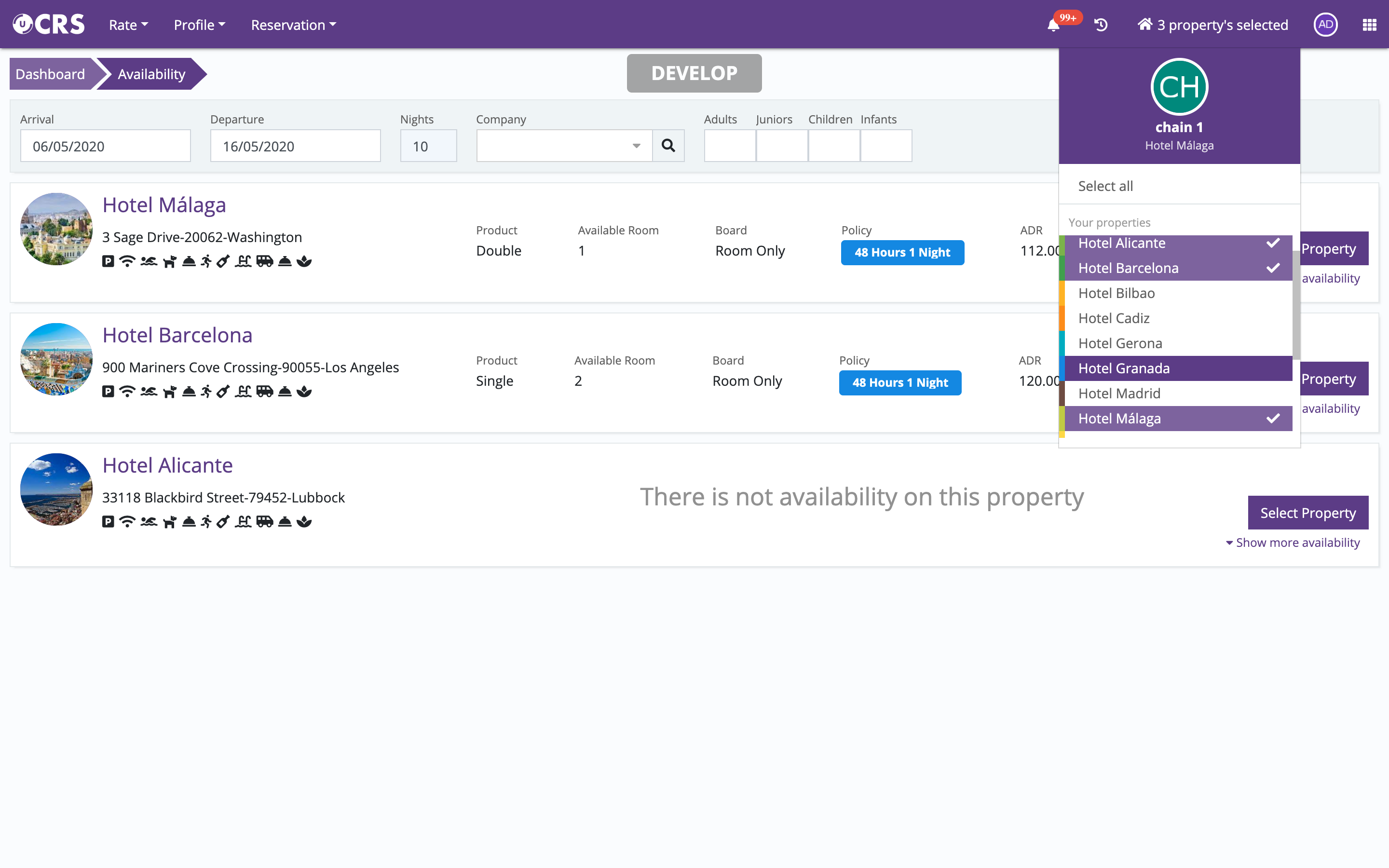
- Multi-property Availability Query
It is now possible to make an availability query for all hotels or for the selected ones.
The result returns the best available accommodation for each of the properties and in the meal plan set as default for each of the properties.
 Ulyses CON / Marketplace
- Expanded information in the room endpoint, which reports the status of the room (occupied, free, or blocked)
- Expanded functionalities in the Public API, this time related to accounting information
- Production endpoints (by date, by product)
- Invoice endpoints
- Payment endpoints
- Endpoints for paid credit consumption